
Where the Investigation Falls Apart Before the First Command
The scenario lands hard: new hires in Seattle can sign in to their laptops, but the file share is unreachable and the mapped drive never appeared. Existing employees nearby are fine. A change window ran last night. Most mid-level candidates hear "change window" and pivot immediately to Group Policy, and that is where they start dropping points.
Sign-in working does not mean authentication is fine. It means the domain controller issued a Kerberos ticket. The token could be stale, the security group membership might not have replicated, the GPO could have applied with a misconfigured security filter, or DNS could be returning a wrong record for the file server. Those are four separate failure modes that look identical from a user symptom standpoint. The Systems Administrator Windows System Administration interview tests whether you know that distinction and whether you can sequence an investigation through those layers under time pressure.
Key Findings
- The rubric awards 60 of 100 points across two dimensions: Interviewer Objectives Alignment (30 pts) and Level-Specific Expectations (30 pts), both testing structure and judgment before any command is named.
- Phase 1 (minutes 0-8) holds 5 checklist items, all focused on scoping and hypothesis formation before any tool is opened.
- Phase 2 (minutes 8-22) is the longest phase at 14 minutes and carries 8 distinct checklist items covering AD group membership, GPO application, DNS resolution, Kerberos token state, and share vs. NTFS permissions independently.
- Phase 3 (minutes 22-30) checks for a concrete remediation path tied to the identified root cause, not just a list of commands run in sequence.
- The mid-level bar (2-5 years) requires naming dependencies like DNS-for-AD and GPO security filtering without prompting; knowledge that needs to be drawn out by the interviewer costs points in Level-Specific Expectations (30 pts).
- The blueprint explicitly expects candidates to "reference the recent change window as a lead but not assume causation prematurely," a dedicated Phase 1 checklist item.
- Technical Proficiency (20 pts) and Communication and Problem Solving (20 pts) make up the remaining 40 points, rewarding knowing when to use gpresult vs. repadmin vs. Event Viewer, not knowing all three at once.
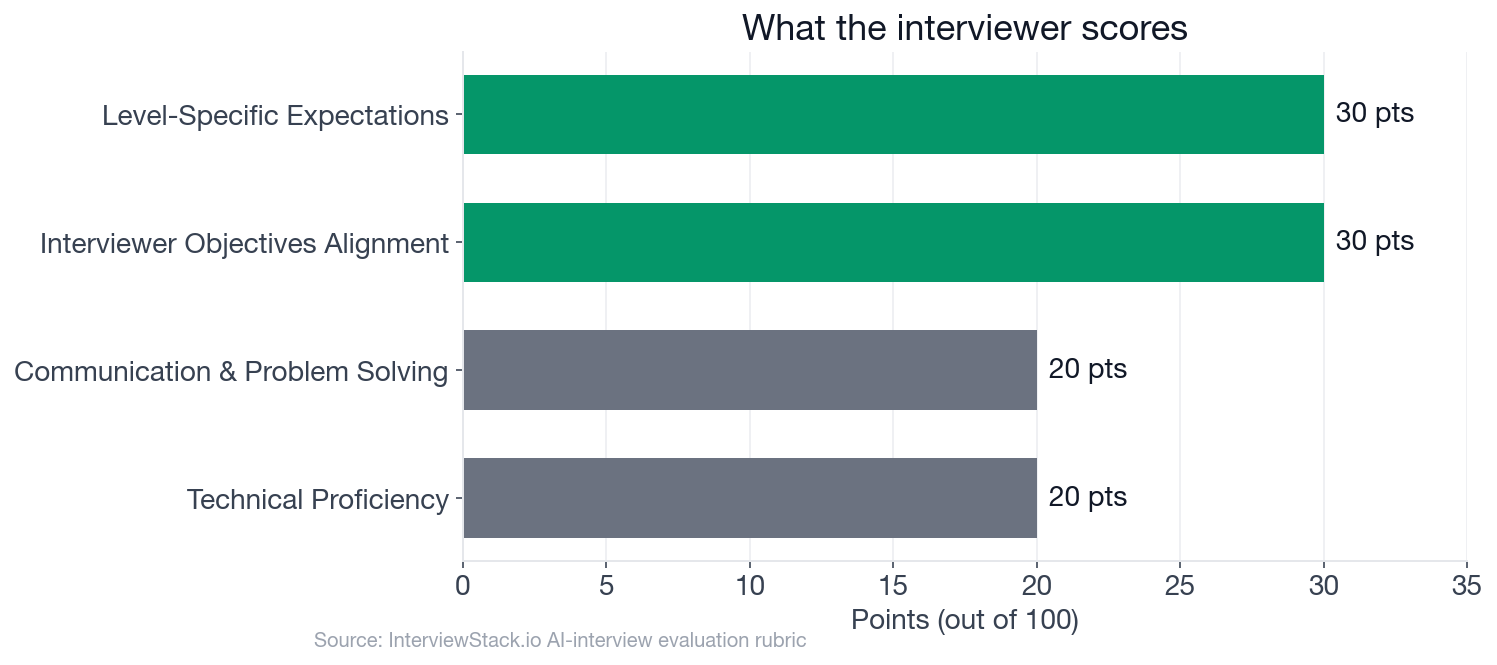
The four rubric dimensions. Sixty points are decided by how you structure and sequence your answer, not by which commands you recall.
The Windows System Administration Interview Scenario
The interview question
You are the primary Windows Systems Administrator for a business unit at a large technology company. Early this morning, a newly joined group of employees in the Seattle office reported that they can sign in to their laptops, but they cannot access an internal file share and several of them are also not receiving a mapped drive or the expected security settings. Existing employees in the same office appear mostly unaffected. The environment is domain-joined, uses Active Directory, Group Policy, DNS, DHCP, and Windows file servers. A change window last night included routine Windows updates on several servers and a small Group Policy change intended for new hires.
Your task is to walk me through how you would investigate, contain, troubleshoot, and resolve this issue in a production Windows environment while minimizing user impact. How would you approach this situation end to end?
The interviewer's objective reaches past Windows knowledge: they want to see you sequence an investigation across authentication, GPO, name resolution, and file authorization layers without jumping between them randomly, while keeping production impact low and maintaining rollback readiness throughout.
The Walkthrough: Four Turns Where Points Are Won and Lost
Turn 1: Triage vs. Assumption
Interviewer: "What signals would help you decide whether this is primarily an authentication problem, a Group Policy problem, a name resolution problem, or a file server permissions problem?"
Turn 2: GPO Scope and Filtering
Interviewer: "If the affected users are all in one OU and only new hires are impacted, how would you verify whether Group Policy scope, inheritance, filtering, or loopback is involved?"
Turn 3: DNS Tells the Story
Interviewer: "Suppose users can ping the file server by IP but not by name, and some can access the share after logging off and back on. How would that change your investigation?"
Turn 4: Prevention Over Reaction
Interviewer: "Once service is restored, what preventive changes would you put in place around change control, monitoring, or automation so this class of issue is easier to detect and safer to roll out next time?"
Spotting the Mistakes Here Is the Easy Part
You just watched where the points disappear. In a live 30-minute session you cannot re-read the scenario, the follow-ups are unscripted, and every answer you give shapes the next question. The candidate who knows GPO syntax but loses the triage thread in Phase 1 still leaves 30 points on the table. That gap between knowing the material and performing under pressure only closes through reps in conditions that feel like an actual interview. The AI mock interview for Systems Administrator Windows System Administration delivers exactly that: unscripted follow-ups, a real-time blueprint tracking which checklist items you hit, and post-interview coaching on where your reasoning fell short.
What a Strong 30-Minute Answer Looks Like
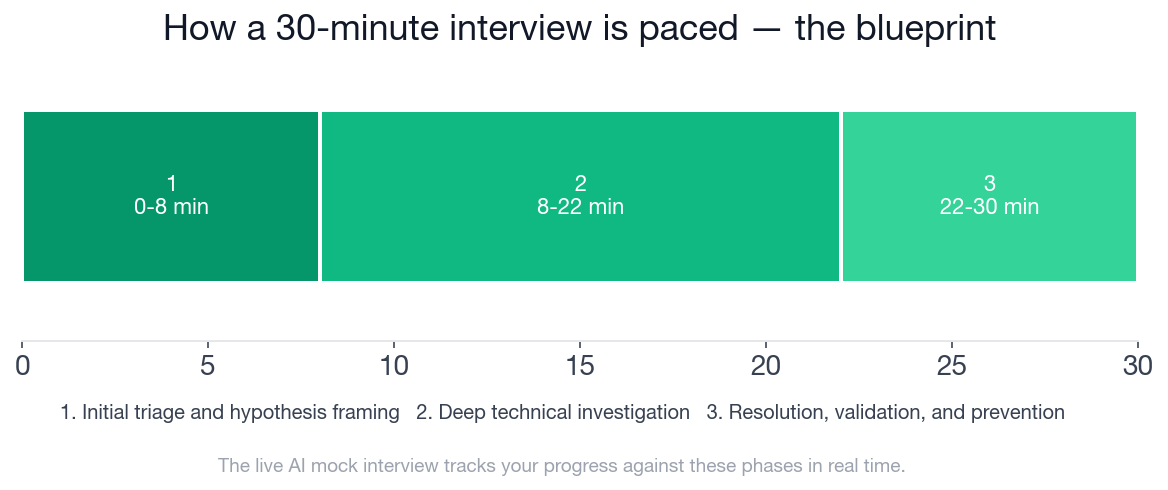
The three phases and their time allocations. Phase 2 runs 14 of the 30 minutes and carries 8 distinct checklist items.
This is the blueprint a strong candidate hits, and the exact thing the AI mock interview tracks you against in real time:
- ✓Clarifies scope by distinguishing affected users, devices, office location, timing, and whether issue is limited to new hires
- ✓References the recent change window as a lead but does not assume causation prematurely
- ✓Breaks the problem into likely categories such as authentication, GPO application, name resolution, connectivity, and authorization
- ✓Proposes validating with one affected user and one unaffected user or machine for comparison
- ✓Mentions minimizing user impact through rollback readiness, communication, or temporary access workaround if appropriate
- ✓Checks whether affected accounts are in the correct OU and expected AD security groups
- ✓Discusses verifying replication or recent membership changes using AD tools such as repadmin or checking multiple domain controllers
- ✓Uses gpresult, rsop, or Group Policy Management to verify whether expected policies and drive mapping settings applied or were denied
- ✓Recognizes that sign-in success does not rule out downstream Kerberos/group token or policy application issues
- ✓Checks DNS configuration on client machines, validates name resolution for domain controllers and file servers, and distinguishes name-based versus IP-based access symptoms
- ✓Mentions client-side commands or logs such as ipconfig /all, nslookup, klist, whoami /groups, Event Viewer, and Test-NetConnection where relevant
- ✓Validates file share and NTFS permissions separately and ties access to intended group membership or onboarding workflow
- ✓Considers whether server patching, a changed GPO security filter, WMI filter, loopback, or a startup/logon processing issue could explain the symptom pattern
- ✓Proposes a concrete remediation path tied to the suspected cause, such as rolling back a GPO change, correcting OU placement, fixing DNS settings, forcing replication, or refreshing user policy/token
- ✓Explains how they would validate success on an affected user and ensure no broader regression for unaffected users
- ✓Mentions commands or actions like gpupdate, logoff/logon, policy reprocessing, or replication confirmation only after identifying when they are appropriate
- ✓Describes post-incident improvements such as staged GPO rollout, test OU usage, better change documentation, onboarding automation checks, or monitoring for policy processing failures and access denials
- ✓Communicates a practical incident closeout mindset with root cause, corrective action, and preventive action
Practice the Scenario Before the Real Interview
The AI mock interview for Windows System Administration runs this full 30-minute scenario with live follow-ups, a real-time Blueprint that tracks which phase checklist items you hit, and post-interview coaching on where your reasoning fell short. That is the practice loop that closes the gap between reading a walkthrough and performing in the seat.
For targeted drilling before the full scenario, the Windows System Administration question bank lets you work through Group Policy, Active Directory, DNS, and Kerberos topics individually. Browse Systems Administrator openings to see how the role appears in current postings, and use the interview preparation guides for environment-specific patterns.
FAQ
Q. What is the most common mistake in a Windows Systems Administrator interview?
Jumping to the change window as the confirmed cause before scoping the incident. The Phase 1 checklist specifically requires referencing the change window as a lead while not assuming causation prematurely. Candidates who start with GPO troubleshooting before confirming scope lose points in both Interviewer Objectives Alignment (30 pts) and Communication and Problem Solving (20 pts).
Q. What does a mid-level Systems Administrator interview cover for Windows System Administration?
The mid-level bar (2-5 years of experience) tests whether you can independently troubleshoot common Windows domain issues without heavy prompting. Evaluators expect you to name core dependencies (DNS for Active Directory, GPO inheritance and security filtering, Kerberos token refresh, AD replication timing) unprompted, propose a structured order of operations, and discuss rollback and validation steps.
Q. How long is a Windows System Administration interview, and what are the phases?
The AI mock interview blueprint for this topic runs 30 minutes across 3 phases: Initial triage and hypothesis framing (0-8 min), Deep technical investigation (8-22 min), and Resolution, validation, and prevention (22-30 min). Phase 2 is the longest at 14 minutes and carries 8 distinct checklist items.
Q. Which Windows troubleshooting commands matter most in a Systems Administrator interview?
The expected checklist in Phase 2 covers gpresult, ipconfig /all, nslookup, klist, whoami /groups, Test-NetConnection, dcdiag, and repadmin. The key is demonstrating when to use each one, not listing them all upfront. Naming a command unprompted and explaining what you would look for in the output signals practical experience to evaluators.
Q. How is Group Policy knowledge assessed in a Systems Administrator interview?
Evaluators check whether you can distinguish GPO scope, inheritance, security filtering, WMI filtering, and loopback as distinct failure modes. Phase 2 expects you to use gpresult or the Group Policy Management console to determine whether a policy applied or was blocked, and to explain why each outcome points to a different root cause.
Q. How is a Systems Administrator interview scored?
The rubric has 4 dimensions: Interviewer Objectives Alignment (30 points), Level-Specific Expectations (30 points), Technical Proficiency (20 points), and Communication and Problem Solving (20 points). The two highest-weighted dimensions reward structure, triage discipline, and knowledge of enterprise dependencies, not just command recall.
Q. How can I practice for a Windows System Administration Systems Administrator interview?
Use the AI mock interview to run the full 30-minute scenario in real time, where the interviewer follows up on your answers and the live Blueprint tracks your progress through each phase. The Windows System Administration question bank lets you drill specific topics like Group Policy, DNS, and Active Directory before running the full scenario.
Why the Blueprint Ends on Prevention
Prevention is Phase 3 because it is also the hardest part of the answer. Anyone can name a command after the fact. A strong mid-level closeout shows a root cause, a corrective action, and a change to the system that makes the same failure less likely the next time onboarding runs at scale. That operational maturity is what Phase 3 is scoring, and it is worth practicing before you are sitting across from it.
Topics
Ready to practice?
Put what you've learned into practice with AI mock interviews and structured preparation guides.